Foldable Magnetic 3-in-1 Charger: iPhone, Watch, AirPods

Foldable Magnetic 3-in-1 Wireless Charging Station (15W) for iPhone, Apple Watch, and AirPods
A foldable magnetic 3-in-1 charging station can replace a nightstand full of cables with one compact hub for iPhone, Apple Watch, and AirPods. Instead of hunting for three separate cords (and three outlets), you get a single place to dock your everyday Apple essentials. Below is a practical breakdown of how these chargers work, what features make the biggest difference day to day, and how to set one up for consistent fast charging at home, at the office, or on the road.
What a foldable magnetic 3-in-1 charging station does
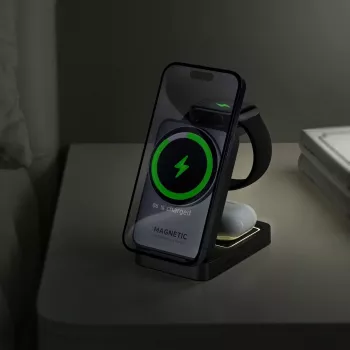
A 3-in-1 charging station combines three charging zones into one power-fed device: a magnetic phone pad, a watch charging spot, and a base area for earbuds. You plug in one cable, then charge multiple devices in a single routine—phone on the magnetic pad, watch on its charger, and AirPods on the base.
The “magnetic” part matters for iPhone users because magnetic alignment helps keep the phone centered over the charging coil. Better alignment reduces the common issues that can cause wireless charging to slow down, briefly disconnect, or fail to charge consistently overnight.
The foldable build is the final piece: it makes the station easier to pack, easier to store in a drawer, and simpler to move between a bedside setup and a desk setup without dragging a bundle of cables along with it.
Key features that matter for everyday charging
15W phone charging support (with the right adapter)
A 15W-rated wireless phone pad can deliver quicker top-ups than basic 5W wireless pads, especially for short charging windows during the day. Actual speed depends on your iPhone model, power adapter, temperature, and whether the phone is being used while charging.
Stable hinge and base
Foldable stands should open smoothly and stay put. A stable hinge helps keep the phone from wobbling when you tap the screen for notifications, FaceTime, or StandBy-style viewing.
Surface grip and magnet strength
A grippy base helps prevent sliding on smooth furniture (think lacquered nightstands or hotel desks). Strong, consistent magnet alignment makes “dock and go” charging feel reliable instead of finicky.
Case compatibility
MagSafe-compatible cases generally provide the best experience because they keep magnetic alignment predictable. Very thick cases, wallet attachments, pop sockets, or metal accessories can reduce charging efficiency or interrupt charging altogether.
Heat management
Wireless charging naturally produces warmth. A well-designed stand should leave room for airflow and avoid trapping heat under devices—important for overnight charging where heat buildup can lead to automatic speed reductions.
Compatibility checklist before buying
Before choosing a 3-in-1 station, confirm the basics for each device so you don’t end up with a “sort of works” setup.
| Device | What to check | Good sign it will work well |
|---|---|---|
| iPhone | MagSafe support and case thickness | Magnet snaps into place and stays centered |
| Apple Watch | Watch model and band bulk | Watch sits flat and begins charging immediately |
| AirPods | Wireless-charging case (Qi/MagSafe) | Charging indicator turns on when placed on the base |
For earbuds, the key detail is the case: AirPods need a wireless-charging compatible case (Qi or MagSafe). If the case is wired-only, it won’t charge on a wireless base. If you want a deeper overview of the Qi standard itself, the Wireless Power Consortium is a reliable reference.
How to set it up for fast, reliable charging
1) Start with a quality power adapter
Multi-device wireless charging is only as dependable as the power feeding it. Use a reputable wall adapter rated for multi-device charging; an underpowered adapter can cause slow charging, random disconnects, or “cycling” where devices repeatedly start and stop charging.
2) Place it on a firm, breathable surface
3) Let the magnet do the alignment work
4) Remove accessories that interfere
5) Use Optimized Battery Charging for overnight routines
Apple’s optimized charging features can reduce battery wear while still getting you to a full charge by morning. For iPhone-specific details, see Apple Support: About Optimized Battery Charging on iPhone.
Using it at a desk, bedside, or while traveling
Bedside
Desk
Travel
What to expect from wireless fast charging
Product spotlight: Foldable Magnetic 3-in-1 Wireless Charging Station – 15W Fast Charger
If the goal is a compact, travel-friendly hub for Apple devices, the Foldable Magnetic 3-in-1 Wireless Charging Station – 15W Fast Charger for iPhone, Apple Watch, and AirPods is designed for exactly that routine: phone on the magnetic charging surface, watch on the dedicated spot, and AirPods on the base.
Helpful add-on for a cleaner desk setup
If your charging station is part of a wider “less clutter” workspace refresh, pairing it with a dedicated audio accessory can help keep your desk just as streamlined for calls. The Professional Wired Condenser Conference Microphone is a simple option to keep meeting audio consistent without relying solely on laptop mics.
Simple care and safety tips
FAQ
Will a 3-in-1 wireless charging station charge all three devices at the same time?
Yes—when the station is connected to a sufficiently powerful adapter, it can charge your iPhone, Apple Watch, and AirPods at the same time. If the adapter is underpowered, total power may be limited, which can slow charging or cause devices to connect and disconnect.
Do AirPods need a special case to charge on the base?
AirPods need a wireless-charging compatible case (Qi or MagSafe) to charge on the base. If the case is wired-only, it won’t charge on a wireless pad.
Why does wireless charging sometimes feel slow or stop overnight?
The most common causes are misalignment, thick cases or accessories, heat buildup that triggers automatic slowdowns, heavy background phone activity, or using a low-watt power adapter. Re-centering the phone on the magnet and using a stronger adapter typically fixes most overnight issues.






Leave a comment