Dual-Screen 4K WiFi Android Projector: Stream & Multitask
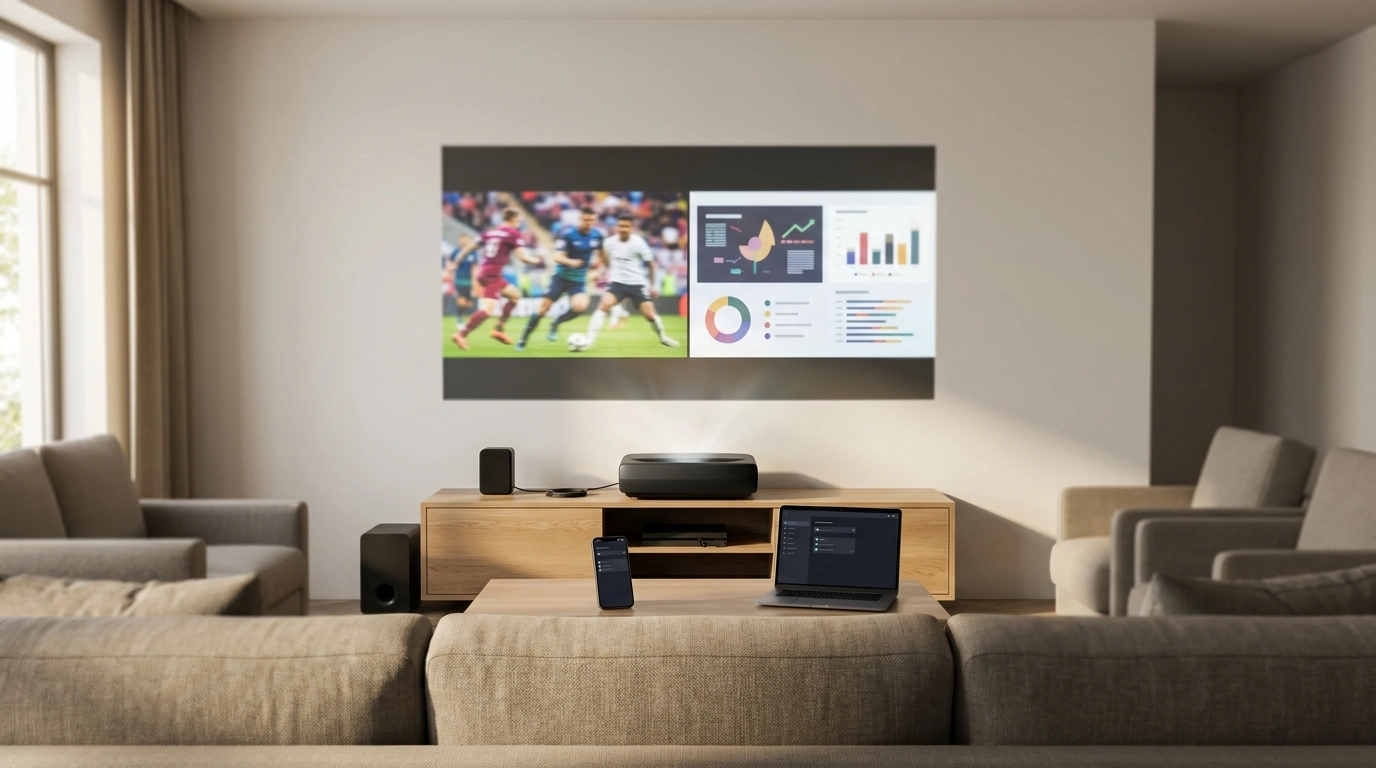
4K WiFi Projector with Dual Screen & Android OS: Big-Screen Streaming and Multitasking at Home
A projector that combines built-in Android, wireless casting, and a dual-screen mode can replace multiple living-room and home-office devices at once. Dual-screen projection is especially handy when a single stream isn’t enough—think sports plus a second feed, a lesson plus reference material, or a meeting deck alongside notes. Add built-in Android for app-based playback and you get fewer boxes, fewer cables, and faster setup when it’s time to watch, play, or present.
What Dual Screen Means in Real Life
Dual-screen projection typically means the projector can display two sources at the same time—often as a split layout—so you can keep more than one thing visible without constantly switching inputs. In practice, it’s useful for side-by-side content, mirroring a phone while keeping another source ready, or splitting media from on-screen controls when supported.
- Where it shines: watch parties (two games at once), sports + stats, classroom demos (example vs. solution), and comparing slides, images, or documents.
- Limitations to expect: each window is effectively smaller, so fine text and UI elements can be harder to read. Brightness is also “spread out” across the full projected canvas, so a brighter environment can make both windows look flatter.
- Best viewing setups: a larger screen/wall and slightly closer seating help keep dual-window content readable. If text matters, prioritize a centered placement and precise focus.
Android OS Built In: Streaming Without Extra Boxes
With Android built in, the projector can act like a stand-alone streaming hub. Instead of relying on a separate stick or laptop, you navigate apps directly on the projector, reducing cable clutter and simplifying “turn it on and play” routines.
WiFi Projection and Casting: Getting a Stable Connection
- Wireless options to look for: screen mirroring from Android/Windows, AirPlay-style casting for Apple devices, and app-based casting when supported.
- Reduce lag and disconnects: place the router closer, use less congested WiFi bands when available, and keep the projector’s firmware updated. Basic device discovery steps (same network, permissions, no VPN interference) often solve “can’t find the projector” issues—see Google’s overview: Wi‑Fi device discovery and connection basics.
- When to use a cable instead: gaming, live presentations, and any scenario where latency or reliability matters more than convenience.
- Quick checklist: confirm the right input/source, verify both devices are on the same network, accept casting permissions, and disable VPNs that can block discovery.
Picture Quality Basics: Resolution, Brightness, and Contrast
Sharpness and punchy color aren’t just about “4K” labels. Real-world picture quality comes from how the projector handles focus, placement, ambient light, and the surface you’re projecting onto. For a deeper general primer, RTINGS has a useful overview: Projectors (Buying Guide).
Quick setup decisions that most affect image quality
| Decision | Best choice for movie nights | Best choice for presentations |
|---|---|---|
| Room lighting | Dark or dim lighting | Controlled lighting or brighter screen |
| Placement angle | Centered and level | Centered and level whenever possible |
| Screen surface | Matte white or gray screen | Matte white screen with clean background |
| Input method | Built-in apps or HDMI | HDMI for reliability; casting as backup |
Audio: Built-In Sound vs. External Speakers
Best Uses: Home Theater, Gaming, Work, and Classroom
- Home theater: go darker, go bigger, and use a stable streaming source. If your WiFi is busy, switching to HDMI can instantly clean up playback.
- Sports and events: dual-screen can keep two feeds visible, or pair a main stream with a secondary window (scores, chat, or another game) when supported.
- Gaming: HDMI is the safest choice for fast response. Minimize keystone to reduce extra processing, and use a “game mode” setting if available. For more on the standard itself, see: HDMI specification overview.
- Work and learning: dual-screen helps compare documents, run a demo alongside notes, or keep reference material visible while presenting.
Setup Steps That Prevent Most Problems
Product Snapshot: 4K WiFi Projector with Dual Screen & Android OS
If the goal is flexible, cable-light viewing with quick switching between entertainment and “get-it-done” tasks, the 4K WiFi Projector with Dual Screen & Android OS is built around that workflow: built-in Android for app-based playback, WiFi casting for easy sharing, and dual-screen capability for multitasking scenarios.
For meetings, training sessions, or hybrid setups where voices need to be clearer at the far end of the room, pairing it with a dedicated mic can help. Consider the Professional Wired Condenser Conference Microphone for straightforward, wired reliability.
At-a-glance details
| Item | Value |
|---|---|
| Product | 4K WiFi Projector with Dual Screen & Android OS |
| Price | 239.51 USD |
| Availability | In stock |
FAQ
Does dual-screen mode reduce image quality or size?
Dual-screen typically reduces the usable size of each window, so small text and UI elements can look less readable unless you sit closer or project larger. Perceived sharpness also depends on focus accuracy and processing; full-screen is usually best for movie nights.
Is WiFi casting good enough for gaming?
WiFi casting can add latency, which is noticeable in fast-paced games. For the most responsive play, use HDMI; wireless casting is better for casual gaming, videos, and sharing photos.
Can apps be installed directly on the projector with Android OS?
Android-based projectors commonly allow app installation, letting you stream without an external device. App compatibility can vary, so keeping the system updated and testing your preferred services ahead of time helps avoid surprises.




Leave a comment